Free online FEM calculator with Eurocode design checks
Welcome to femonline.eu.
I had grown tired of needing an enterprise system every time I wanted to analyse a smaller structure quickly, simply and completely. For a long time I thought about how to build a solid FEM solver in which I could reliably and fairly easily work out the loads (floor and roof build-ups and the like), build the model, and assess at least the most common load effects — with the plain outputs an engineer needs, either to Excel or straight to PDF. Because the project started as an online tool, other features followed, such as sharing a model by link or sending it by e-mail. The program has its limits: it runs in the browser’s memory, so I do not plan to add surface (plate/shell) or 3D solid elements in the foreseeable future, and the number of members that can be entered is limited too.
The program is under continuous development. It should reach its final state at the end of November 2026; after that I expect only minor bug fixing, followed by tutorial videos on YouTube. If larger changes come, I will keep the older versions available, so that users can go back to the specific version of the program they need.
The whole project is self-funded and freely available, commercial use included.
EN 1990 · EN 1992 · EN 1993 · EN 1995 · EN 1998
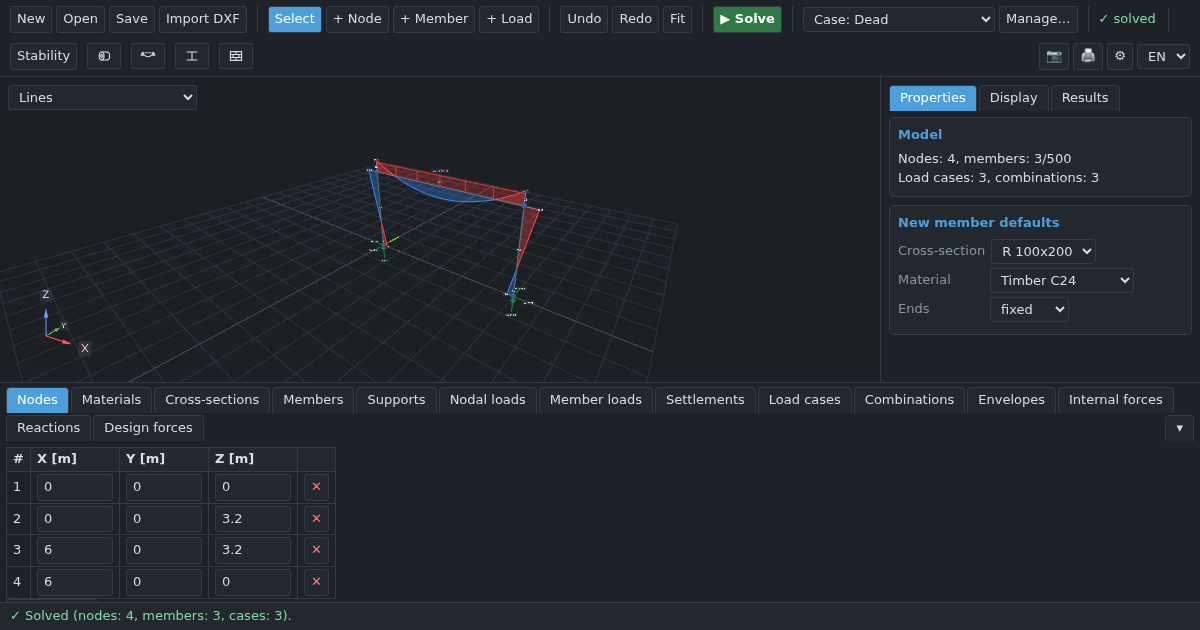
A complete 3D frame analysis, in the browser
The solver is a full 3D finite-element frame analysis: 12-degree-of-freedom beam elements with end releases, rigid eccentric offsets, elastic (spring) supports and support settlement. Everything runs client-side, so there is nothing to install and nothing to upload.
- Nodal and member loads: uniform, trapezoidal and partial distributed loads, point forces and moments, temperature loads, in local or global axes, plus automatic self-weight — and snow, wind and icing load calculators
- Load cases with Eurocode action types, EN 1990 ULS/SLS combination generator with editable partial and combination factors, and envelopes as first-class objects
- Nonlinear analysis: tension-only and compression-only bars, one-way supports with gaps, two-sided slots, bilinear springs, measured force–displacement curves and one-way end releases — solved by an active-set iteration that reports what lifted off and what went slack
- Stability: second-order P-Delta analysis, the critical load factor αcr of every load case and combination with the EN 1993-1-1 §5.2.1 verdict, buckling mode shapes, buckling lengths suggested from the modes, and EN 1993-1-1 §5.3.2 imperfections
- Dynamics: natural frequencies and mode shapes, EN 1998-1 response spectrum with equivalent seismic load cases, and floor vibration screening
- Results: deflected shape, internal-force diagrams (N, V, M), reactions, envelope min/max bands, and an independent solution check (equilibrium, energy, active-set consistency)
Eurocode design checks — not just analysis
Most free online calculators stop at internal forces. This one carries on to the design check, which is the part that actually takes your time.
- Timber — EN 1995-1-1 (Eurocode 5): cross-section checks and stability (flexural buckling 6.3.2, lateral-torsional buckling 6.3.3) with kmod, γM and kdef, spaced (twin) columns to Annex C, serviceability deflection (winst, wfin), dowel-type connections to §8 and fire design to EN 1995-1-2
- Steel — EN 1993-1-1 (Eurocode 3): cross-section classification (Class 1–4 with EN 1993-1-5 effective sections), §6.2 cross-section resistances, and §6.3 flexural, torsional-flexural and lateral-torsional buckling — angles and tees included — with a searchable library of 2457 profiles from eleven standards (EN, British, American, Japanese, Chinese, Russian, Indian and Australian), plus welded girders and cold-formed purlins
- Concrete — EN 1992-1-1 (Eurocode 2): reinforcement design (longitudinal bars, side bars and links, with support zones), M-N interaction for rectangular and circular sections, shear, §5.8 column slenderness, cover to the exposure class, and serviceability — stress limits, crack width and long-term deflection with creep and shrinkage
- Every assessment produces a printable A4 report you can hand to a checking engineer
Cross-section calculator — properties of any shape
A second, standalone tool for the sections no catalogue carries. Draw any cross-section — polygons, rectangles, circles and holes, catalogue profiles from the same library of 2457 sections, or thin-walled walls as a mid-line with a thickness — and every property is computed as you draw. Open the cross-section calculator
- Exact outline integrals: area, centroid, second moments and product of inertia, principal axes, radii of gyration, elastic moduli at every extreme fibre, and plastic moduli about y, z, u and v
- Finite elements on the section itself: the St Venant torsion constant It, the warping constant Iw, the shear centre and the shear areas, for any shape — solid, open, closed or with several cells
- Thin-walled mode with the mid-line theory beside the finite-element values, mass per metre, paint perimeter, units in mm or cm, and the table copied to Excel or saved as CSV
Why engineers use it
- Free and instant — open a browser tab and model. No licence, no install, no account.
- Private by design — the whole solver runs on your machine. Your model is never uploaded to any server.
- Seven languages — English, Czech, Slovak, Polish, German, French and Spanish.
- Real workflow — DXF import, JSON save/load, CSV and clipboard export of result tables, printable reports.
Who it is for
Structural engineers doing quick frame and roof checks, timber designers sizing purlins and rafters, steel detailers verifying a portal frame, and civil-engineering students learning how frame analysis and Eurocode design fit together. If you need a fast, trustworthy answer without booting up a heavyweight package, this is built for you.
Verification examples
Every result the solver produces is checked against an independent reference — a closed-form hand calculation or a classical method — not just against itself. A few worked examples, as PDF reports:
- Three-hinged portal frame — reactions and bending moments match a hand statics solution to floating-point precision. View PDF
- King-post roof truss — every member axial force, including a zero-force member, matches an exact method-of-joints solution. View PDF
- Simply supported beam under a distributed load — reactions, shear, moment and deflection all match the classical Euler-Bernoulli solution. View PDF
- Beam with a rotational end spring — spring moment, reactions, deflection and end rotations match the closed-form force-method solution for any spring stiffness, from a pin to full fixity. View PDF
- Cantilever column, second-order analysis — linear results match the cantilever formulas exactly; the P-Δ results and the critical load factor match the exact beam-column solution, converging as the column is meshed finer. View PDF
- Natural frequencies of a simply supported beam — the modal analysis reproduces the exact solution of its lumped-mass model to round-off with both eigensolvers: frequencies, mode order in all three directions (strong axis, weak axis, axial) and effective masses; against the continuous Euler-Bernoulli beam the first frequency is within 4·10−7 on 20 members, converging as h4. View PDF
- Euler buckling of columns with four support conditions — the linear buckling analysis reproduces Euler’s critical loads for fixed–free, pinned–pinned, fixed–pinned and fixed–fixed columns — first and second modes in both bending planes, in the correct order with no repeated factor skipped — together with the buckled shapes and buckling lengths; with 10 members the governing αcr is within 10−6, converging as h4 and holding on meshes of up to 1 000 members. View PDF
- Linear time history of a single oscillator — a cantilever with a mass at its top, released, struck by a sudden load, driven harmonically and shaken by its base: modal superposition matches the closed-form response to round-off, Newmark integration matches its own recurrence worked by hand to round-off, base shear with the damper force included, and both converge to the exact solution as Δt2. View PDF
- Response spectrum analysis of a two-mass cantilever — periods, participation factors and effective masses with all four eigensolvers, the EN 1998-1 design-spectrum ordinates, modal base shears, the exported equivalent static forces and the static results of each mode and of their SRSS combination match the exact solution of the two-degree-of-freedom system to round-off. View PDF
- X-braced bay with tension-only diagonals — the nonlinear solver finds the active rod for either load direction; reactions, member forces and deflections match the method of joints and the force method exactly, and combinations are solved on their total load. View PDF
- Timber beam in bending (EC5) — a laterally unrestrained C24 beam: kmod, design strengths, bending, shear and lateral-torsional buckling utilizations match an EN 1995-1-1 hand calculation. View PDF
- Timber column, buckling about both axes (EC5) — a glulam column with different buckling lengths about y and z: slenderness, kc and the buckling interactions (6.23/6.24) with bending match an EN 1995-1-1 hand calculation. View PDF
- Steel beam, lateral-torsional buckling (EC3) — a fork-supported IPE 300 under a uniform load on the top flange: C1 from the moment diagram, the load-height term, Mcr, χLT,mod and Mb,Rd match an EN 1993-1-1 hand calculation, with the load on the top flange and at the shear centre. View PDF
- Steel columns, buckling in class 3 and class 4 (EC3) — two S355 hollow-section columns on either side of the class 3/4 limit: classification, the effective width of each wall (EN 1993-1-5), Aeff, slenderness and Nb,Rd match an EN 1993-1-1 hand calculation. View PDF
- Steel angle strut, flexural-torsional buckling (EC3) — two struts of an equal angle L 100×100×10, S235, 0.8 m and 2.5 m long: principal axes u and v, the shear centre, Ncr,T and the coupled Ncr,TF of 6.3.1.4 match an EN 1993-1-1 hand calculation; flexural-torsional buckling governs the short strut, flexure about v the long one. View PDF
What’s new: a model from AI
If you are a fan of AI, you can now create a rough model just by describing it, for example in ChatGPT. Whether you have an account or use the free version, the AI can create a link with the structure generated from your inputs. How it works:
- At the start of the conversation, tell the AI that you want to create a structural model as a link for the femonline calculator, following the instructions at https://femonline.eu/ai/fem-model-link.txt
Prompt to copy:
I want to create a structural model as a link for the FEM Online calculator. First read the instructions at https://femonline.eu/ai/fem-model-link.txt and follow them exactly. Then ask me for anything you still need (geometry and dimensions, materials, cross-sections, supports, hinges, loads). Finally give me the link and the model text in a code block.
- Give the AI all the inputs — dimensions, material, hinges and so on — and ask it for the link.
- Click the link and the generated model opens in your browser.
- Go back to the conversation and continue with the changes you need. The AI generates a new link again.
I chose this approach as the first way of using AI to build a model. It is independent: it does not interfere with the calculation and does not alter the model afterwards.
Frequently asked questions
Is the FEM calculator really free?
Yes. It is free to use during the beta, with no registration and no licence key. In the future the price will not exceed €10 per month or €99 per year.
Do I need to install anything?
No. It runs entirely in your web browser. There is nothing to download or install.
Which Eurocodes are supported?
EN 1990 for load combinations, EN 1995-1-1 and EN 1995-1-2 for timber (including fire), EN 1993-1-1 and EN 1993-1-5 for steel, EN 1992-1-1 for concrete, and EN 1998-1 for the response spectrum.
Does it perform second-order (P-Delta) analysis?
Yes. Second-order P-Delta analysis can be enabled per project, and a linear-buckling stability check is also available.
Can it model tension-only bracing or uplift at a support?
Yes. Members can be tension-only or compression-only, supports can act one way with a gap, and releases and springs can behave differently in each direction. The solver finds which parts are active for every load case and combination and reports it.
Is my structural model uploaded to a server?
No. The entire finite-element solver runs client-side in your browser. Your model stays on your own computer.
Can I print a calculation report?
Yes. Analysis results and each Eurocode assessment can be printed as a clean A4 report, which your browser can save as PDF.
What are the limits of the calculator?
It handles up to 800 members of frame and beam type. Nonlinearity comes from supports, bars and releases that act one way (with optional P-Delta geometric stiffness); materials stay linear-elastic, and plates and shells are not supported yet.
Ready to try it?
It opens in a second. No sign-up.
Open the calculator